

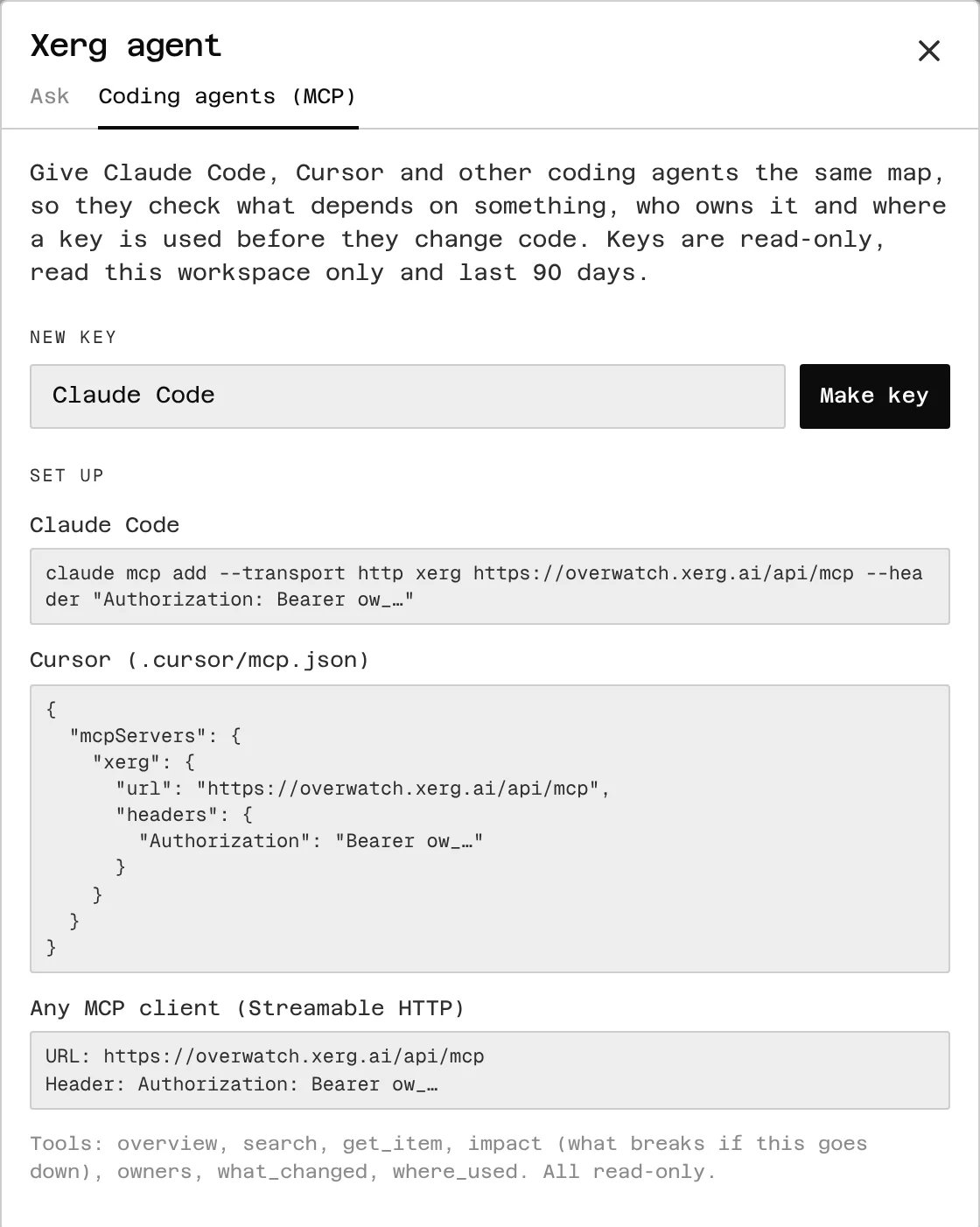
Make a key
- In Xerg, open Ask at the top of the left rail, then the Coding agents (MCP) tab.
- Name the key after what it’s for (say, “Claude Code”) and choose Make key.
- Copy the setup for your agent right away: this is the only time the key is shown.
- are read-only, and read this workspace only
- last 90 days
- allow 600 calls an hour
- stop working when their maker leaves the workspace or becomes a viewer
Claude Code
Cursor
Add this to.cursor/mcp.json in your project (or ~/.cursor/mcp.json for every project):
.cursor/mcp.json
Any MCP client
Xerg’s server speaks Streamable HTTP (stateless, JSON responses).- URL:
https://overwatch.xerg.ai/api/mcp - Header:
Authorization: Bearer ow_…
ow_… with your key. The setup Xerg shows you already has it filled in.
Try it
Ask your agent something the map knows, like:- “Using xerg, what breaks if we rotate
STRIPE_SECRET_KEY?” - “Using xerg, who owns the billing service, and what does it call?”
- “Using xerg, what changed this week?”